Chrome Extensions
Tab Switcher
Chrome extension for switching tabs and copying/pasting content entirely from the keyboard — power users never touch the mouse.
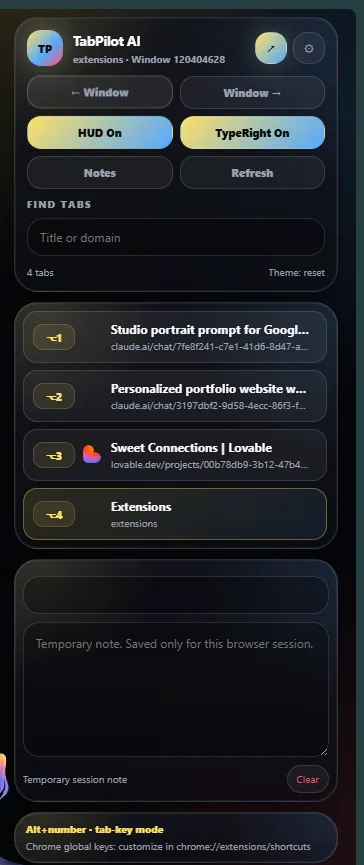
The popup: numbered tab jumps, search, quick toggles and a session scratch note. 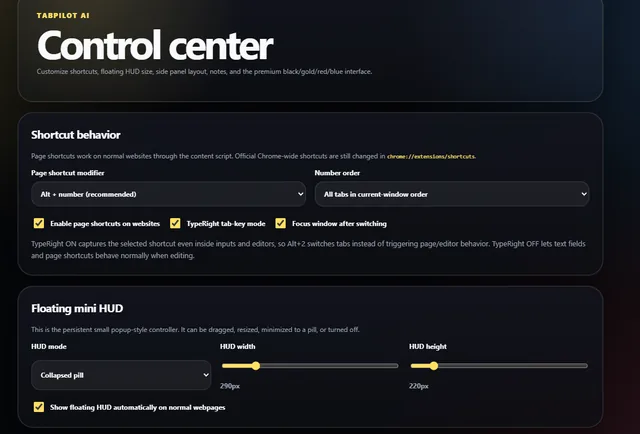
Control Center — shortcut modifier, tab ordering, TypeRight mode and floating HUD sizing. 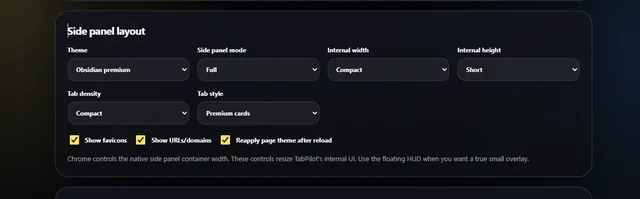
Side panel layout: theme, density, card style, favicons and URL display. 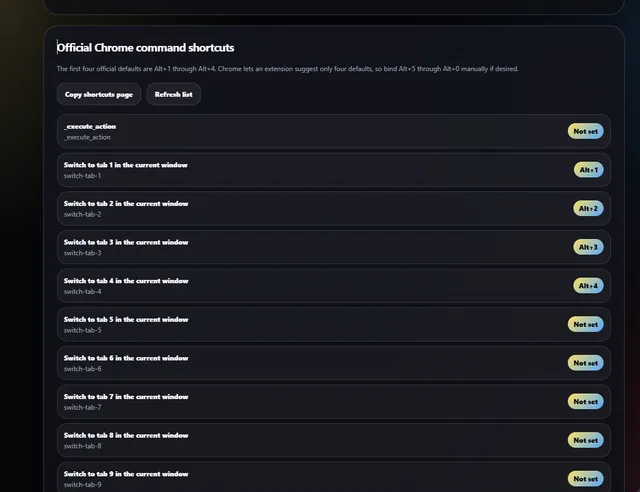
Official Chrome commands, with Alt+1–4 bound by default and the rest available to assign.
About this project
TabPilot AI is a keyboard-first tab controller for Chrome. Alt + a number jumps straight to that tab, so navigating a window full of research, docs and dashboards never needs the mouse. Tabs are listed in current-window order with favicons and domains, and a search field filters them by title or domain as you type.
It ships in three surfaces that share one state: a compact popup for quick jumps, a floating mini HUD that can be dragged, resized or collapsed to a pill and stays pinned over any normal webpage, and a full side panel with a denser tab list. A temporary session note pad sits alongside them for scratch text that clears when the browser session ends.
"TypeRight" mode is the detail power users care about: when it is on, the extension captures the shortcut even inside inputs and editors, so Alt+2 switches tabs instead of triggering the page's own behaviour. Turn it off and text fields behave normally again.
The Control Center exposes everything else — shortcut modifier and tab ordering, HUD size and visibility, side panel theme, density and card style, favicon and URL display, and whether the page theme is reapplied after a reload. Chrome only allows four suggested default shortcuts (Alt+1 to Alt+4), so the extension lists every registered command with its current binding and links straight to chrome://extensions/shortcuts to bind the rest.
Under the hood it is a Manifest V3 extension: a service worker coordinates commands, a content script injects the HUD and page-level shortcuts, and all preferences persist through chrome.storage.local so settings survive restarts.
Tools & tech
- TypeScript
- Chrome APIs
- Manifest V3
- Service Worker
- chrome.storage
Status: Store link coming
Keep exploring
Tab Switcher is one part of what I do. I also work as a freelance web and Chrome extension developer, a social media manager, a short-form video editor and an AI content creator — see the full list of services or book a time to talk about your project.
Related projects
- Web AppsQR SoloQR code generator and scanner. Build custom codes and embed extra data such as timestamps and other material inside them.
- Web AppsIRMakerInvoice and receipt generator for freelancers — create, customise and export professional documents in minutes.
- GamesBrowser GameA browser-based game built with plain web tech — no install, runs instantly in any tab. Final title to be confirmed.